Filing your income tax return in Pakistan used to mean standing in long queues outside Regional Tax Offices, filling stacks of paper forms, and praying your submission was recorded correctly. Those days are over. Thanks to the FBR IRIS portal — officially known as the Integrated Revenue Information System — every Pakistani taxpayer can now register, file, pay, and manage their tax compliance entirely online, from the comfort of their home or office.
Whether you are a salaried professional in Karachi, a freelancer working from Lahore, a business owner in Rawalpindi, or an overseas Pakistani managing property back home, this complete FBR IRIS portal guide for 2026-2027 covers everything you need. From first-time NTN registration to submitting your income tax return and checking your ATL status — you will find it all here, explained in plain, practical language.
Let us get started.
What Is the FBR IRIS Portal?
FBR IRIS stands for Integrated Revenue Information System. It is the official online tax portal of Pakistan's Federal Board of Revenue (FBR), accessible at iris.fbr.gov.pk. Think of it as your personal tax command center — every major tax obligation you have in Pakistan, from getting your National Tax Number (NTN) to filing your annual income tax return and responding to FBR audit notices, happens right here.
IRIS was developed and is maintained by Pakistan Revenue Automation Limited (PRAL) on behalf of FBR. In 2024-2025, FBR launched IRIS 2.0, an upgraded version of the original portal. The new system features a cleaner dashboard, faster processing speeds, improved mobile compatibility, and real-time ATL status updates. If you were using the old IRIS login, IRIS 2.0 is now the active system for all taxpayers.
What Can You Do on the IRIS Portal?
- Register for your NTN (National Tax Number) online
- File your annual income tax return (salaried, business, AOP, or company)
- Submit monthly and annual sales tax returns
- Submit withholding tax statements
- Pay taxes via PSID (Payment Slip ID) through your bank or mobile wallet
- File or update your wealth statement (Form 116)
- Respond to FBR tax notices and audit queries
- Check and download your tax refund status
- Download your filing acknowledgement slip
- Verify your Active Taxpayer List (ATL) status
- Update your profile, address, mobile number, and email
It is the backbone of digital tax compliance in Pakistan — and knowing how to use it properly is no longer optional.
Why Filing Your Tax Return in Pakistan Matters More Than Ever in 2026
Here is something many people overlook: the cost of NOT filing your tax return in Pakistan in 2026 is now significantly higher than the tax itself.
Under FBR's strengthened enforcement framework through the Finance Act 2025, non-filers face serious financial penalties across everyday transactions:
- Higher withholding tax on banking transactions — a non-filer pays 1.2% on cash withdrawals above PKR 50,000 versus 0.6% for filers
- Double withholding tax on property purchases and sales — non-filers pay twice the rate on any property transaction above PKR 5 million
- Higher vehicle registration and token taxes — learn more in our detailed guide on vehicle verification and token tax in Pakistan
- SIM card blockages — FBR has actively enforced SIM blocks for individuals not appearing on the ATL
- Advance tax recovery is being aggressively pursued through third-party data matching
In short, being a non-filer in 2026 costs you real money — on your bank account, your property transactions, your vehicle, and more. Becoming a filer is one of the smartest financial decisions you can make this year.
For a deeper breakdown of the difference, read our guide on salary tax vs income tax in Pakistan.
How to Register on FBR IRIS Portal — Complete Step-by-Step Guide
If you have never filed a tax return before, your first step is registering on the IRIS portal and obtaining your NTN.
Step 1: Visit iris.fbr.gov.pk
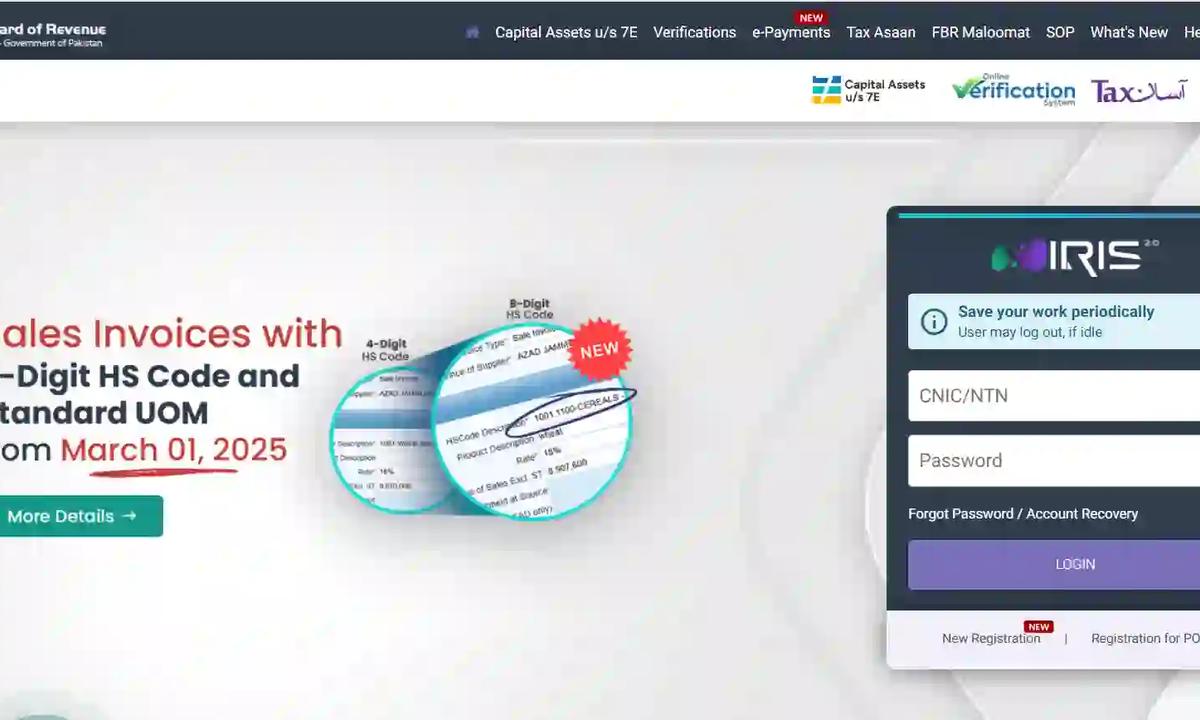
Open your browser and go to https://iris.fbr.gov.pk. You will see the IRIS 2.0 login screen with options for existing taxpayers and new users.
Step 2: Click on "New Registration" (E-Enrollment)
First-time filers should click on "E-Enrollment for Registered Person" or "New Registration". You will be prompted to enter your CNIC (Computerized National Identity Card) number, mobile number, and email address.
Step 3: OTP Verification
FBR will send a One-Time Password (OTP) to your registered mobile number. Enter this code to verify your identity and proceed with the registration.
Step 4: NTN is Generated
After successful verification, your National Tax Number (NTN) is automatically generated. You will receive your IRIS login credentials (NTN/CNIC and a system-generated password) via SMS and email.
Step 5: Log In to IRIS Dashboard
Use your NTN (or CNIC) and password to log in at iris.fbr.gov.pk. Your personal dashboard will display pending declarations, filing options, notices, and payment history.
For business NTN registration, additional documents are required including a partnership deed, incorporation certificate, or sole proprietor documentation. If you face any issues completing online e-enrollment, visit your nearest Regional Tax Office (RTO) in Islamabad, Lahore, Karachi, or Rawalpindi for assistance.
Already have an NTN but no IRIS access? Click "E-Enrollment for Registered Person" and use your existing CNIC and mobile number to recover access.
FBR IRIS Login: How to Access Your Account
Logging into the FBR IRIS portal is straightforward once your account is created. Here is what you need to know:
- Go to https://iris.fbr.gov.pk
- Enter your CNIC or NTN in the username field
- Enter your password
- Click Login
Forgot Your IRIS Portal Password?
If you have forgotten your password, use the "Forgot Password" option on the login page. The system will send a password reset link to your registered email or an OTP to your mobile number for CNIC-based recovery.
Account Locked on IRIS?
After multiple failed login attempts, IRIS automatically locks your account for security purposes. Wait 24 hours for the automatic unlock, or contact the FBR helpline at 051-111-772-772 for faster resolution.
For a full visual walkthrough of the login and password recovery process, visit our dedicated FBR IRIS login guide.
Understanding Income Tax Slabs Pakistan 2026-2027
Before you file your income tax return, you need to know your tax liability. Pakistan uses a progressive tax system under the Income Tax Ordinance 2001, meaning higher-income earners pay at higher rates — but only on the portion of income that falls within each bracket.
Income Tax Slabs for Salaried Persons — Tax Year 2025-26 (Finance Act 2025)
Under the Finance Act 2025, the income tax slabs applicable for salaried individuals earning between July 1, 2025 and June 30, 2026 are:
Up to PKR 600,000 — Zero tax (fully exempt)
PKR 600,001 to PKR 1,200,000 — 1% of the amount exceeding PKR 600,000
PKR 1,200,001 to PKR 2,200,000 — PKR 6,000 + 11% of the amount exceeding PKR 1,200,000
PKR 2,200,001 to PKR 3,200,000 — PKR 116,000 + 23% of the amount exceeding PKR 2,200,000
PKR 3,200,001 to PKR 4,100,000 — PKR 346,000 + 30% of the amount exceeding PKR 3,200,000
Above PKR 4,100,000 — PKR 616,000 + 35% of the amount exceeding PKR 4,100,000
A salaried person is defined under the Income Tax Ordinance as someone whose salary income constitutes more than 75% of their total taxable income. This classification matters because salaried individuals enjoy preferential (lower) rates compared to business income earners.
For a full breakdown of every slab category, read our detailed guide: Pakistan Salary Tax Slabs Breakdown 2026.
Business Income Tax Slabs Pakistan 2026
Non-salaried individuals — including freelancers, sole proprietors, traders, and Associations of Persons (AOPs) — are taxed at slightly higher rates under a separate schedule. The exemption threshold of PKR 600,000 remains the same, but rates from the second slab upwards are higher than the salaried schedule.
Important for Freelancers: If you earn foreign remittances through platforms like Upwork or Fiverr, you are eligible for a reduced withholding tax rate of 0.25% on foreign income — but only if you are an active filer on the ATL. Declare this income under the "foreign income" head in your IRIS return.
How to Calculate Your Income Tax — A Simple Example
Let us say you are a salaried employee earning PKR 1,800,000 per year:
First PKR 600,000 = Zero tax
Next PKR 600,000 (from 600,001 to 1,200,000) = 1% = PKR 6,000
Remaining PKR 600,000 (from 1,200,001 to 1,800,000) = PKR 6,000 + 11% of PKR 600,000 = PKR 6,000 + PKR 66,000 = PKR 72,000
Total Annual Tax = PKR 72,000 | Monthly Tax = PKR 6,000
Want to skip the math and get your exact liability in seconds? Use our free salary tax calculator Pakistan 2026 or the FBR income tax calculator — updated with the latest Finance Act 2025-26 rates.
Also helpful: our full guide on Pakistan salary tax calculator 2026 explains the calculation formula in detail.
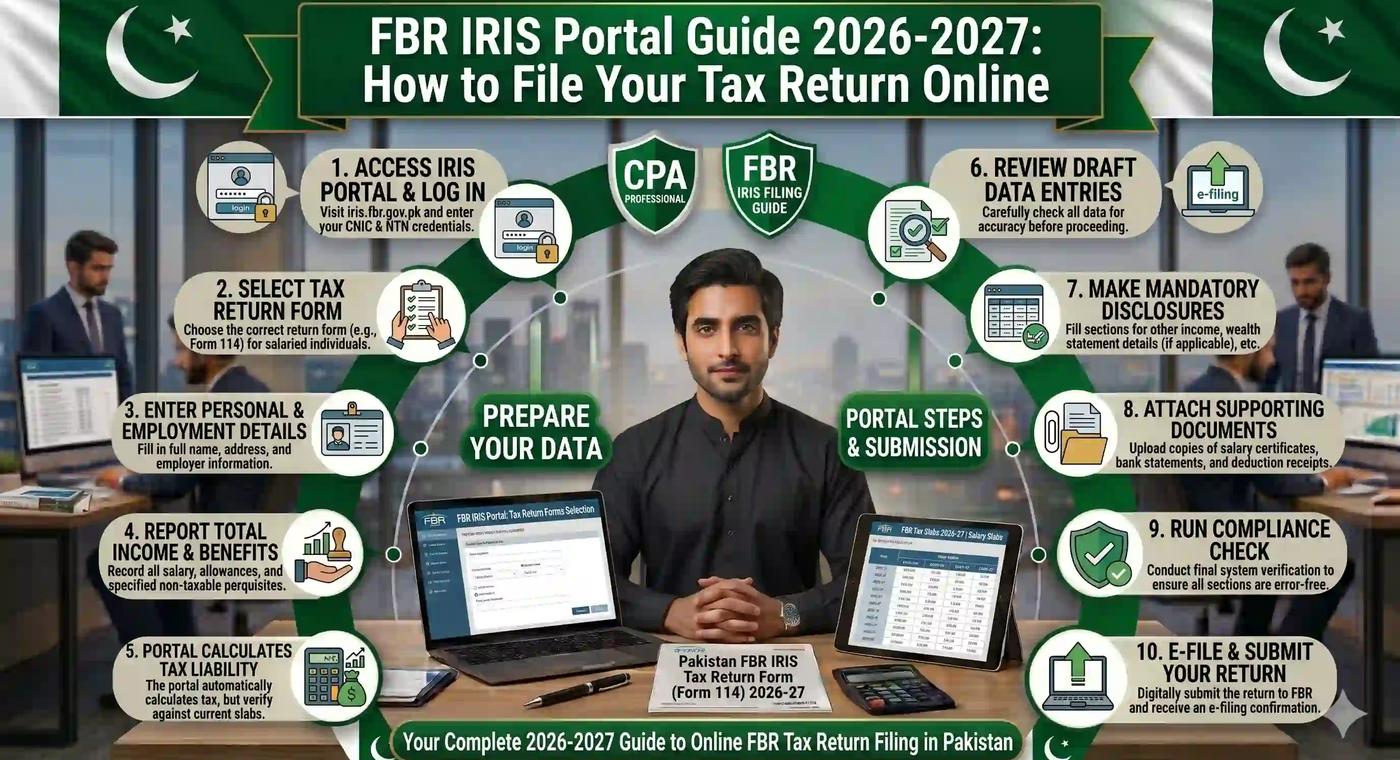
How to File Income Tax Return on FBR IRIS Portal — Step-by-Step 2026
This is the core of everything. Here is exactly how to file your income tax return on FBR IRIS for Tax Year 2025-26 (income earned July 2025 to June 2026):
Step 1: Log In to IRIS
Visit iris.fbr.gov.pk and log in using your CNIC/NTN and password.
Step 2: Go to "Declaration" → "Income Tax Return"
From the left-hand panel of your IRIS dashboard, click on "Declaration" and then select "Income Tax Return".
Step 3: Select the Correct Tax Year
For the 2026 filing season (income earned July 2025 to June 2026), select Tax Year 2025 from the dropdown. Note that FBR labels tax years by the closing year — so Tax Year 2025 covers income earned between July 1, 2025 and June 30, 2026.
Step 4: Enter Your Income Details
Fill in all relevant income heads:
- Salary income — use your employer's salary certificate or annual salary summary
- Business income — gross receipts minus allowable expenses
- Rental income — declare rent received from any property
- Bank profit / savings income — enter profit received on savings or deposits
- Freelancing / foreign income — declare under the foreign income head with remittance certificate
Step 5: Claim Deductions and Tax Credits
This is where many filers leave money on the table. Under the Income Tax Ordinance 2001, you can legally reduce your taxable income by claiming:
- Zakat paid through scheduled banks
- Contributions to approved pension or provident funds
- Life insurance premiums
- Education expenses (for dependent children)
- Home loan interest payments
Wondering how to reduce your salary tax legally? Our guide on how to reduce salary tax legally in Pakistan covers every FBR-approved deduction in detail.
Step 6: Complete the Wealth Statement (if applicable)
If your total declared assets exceed PKR 10 million, you are required to complete the wealth statement using Form 116 within your IRIS return. This reconciles your declared income with your total net worth, including property, vehicles, investments, and bank balances.
Step 7: Review the Computed Tax Liability
IRIS automatically calculates your total tax liability based on the slabs and deductions you have entered. Cross-check this figure with your own calculation or our free FBR tax calculator.
Step 8: Pay Any Outstanding Tax via PSID
If tax is payable (after deducting tax already withheld by your employer), generate a PSID (Payment Slip ID) from within IRIS. Use this to pay through:
- Any bank branch in Pakistan
- Internet banking (major banks including HBL, UBL, Meezan, Bank Alfalah)
- Mobile wallets (JazzCash, EasyPaisa)
Step 9: Submit and Download Your Acknowledgement Slip
Once your return is complete, click Submit. The IRIS portal will immediately generate a filing acknowledgement slip — your official proof of filing. Download and save this document. You will need it for property transactions, bank account openings, visa applications, and various other official purposes.
Your name will appear on the Active Taxpayer List (ATL) within 24 to 72 hours of submission.
FBR IRIS Deadline 2026 — Last Date to File Tax Return Pakistan
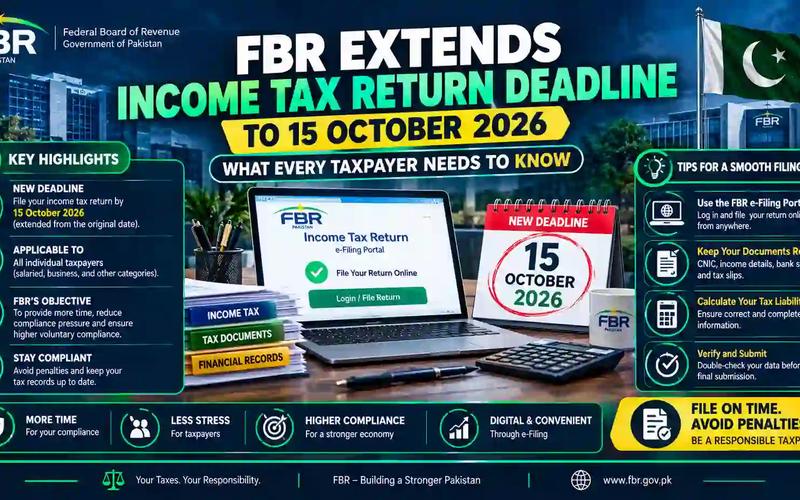
The income tax return deadline for individuals, salaried persons, and AOPs in Pakistan for Tax Year 2025-26 is September 30, 2026.
For companies, the standard deadline is December 31, 2026.
What Happens If You Miss the Tax Return Deadline?
Missing the deadline is costly. Penalties under the Income Tax Ordinance 2001 (Section 182) include:
- A minimum penalty of PKR 40,000 for non-filers
- PKR 1,000 per month of delay (minimum PKR 10,000), or 0.1% of taxable income per week — whichever is higher
- Loss of ATL status — which doubles your withholding tax rates on banking, property, and vehicle transactions
- Risk of mandatory audit selection and increased FBR scrutiny
FBR has sometimes announced deadline extensions via SRO notifications — sometimes by 30 to 60 days. Always verify the latest deadline at the official FBR website (www.fbr.gov.pk) before assuming an extension is in place.
What Is the Active Taxpayer List (ATL) and How to Check Your ATL Status
The Active Taxpayer List (ATL) is FBR's published database of all individuals who have filed their income tax returns. Being on the ATL means you are a recognized active filer — and it comes with significant financial advantages.
Benefits of Being an Active Filer in Pakistan
- Lower withholding tax on bank cash withdrawals
- Reduced property purchase and sale tax (filers pay half the rate non-filers pay)
- Lower vehicle registration and token tax
- Ability to open investment and savings accounts without additional scrutiny
- Required for most formal business registrations and tendering processes
How to Check ATL Status Online
- Go to www.fbr.gov.pk
- Navigate to "Online Verification" or "Taxpayer Facilitation"
- Click on "Active Taxpayer List"
- Enter your CNIC number and verify
You can also check ATL status directly from the IRIS dashboard after logging in. For detailed steps on vehicle-related tax implications of your filer status, see our guides on Punjab vehicle token tax and Sindh vehicle token tax.
How to File Tax Return for Different Taxpayer Categories
Income Tax Return for Salaried Persons Pakistan 2026
The most common filing type. Your employer will provide a salary certificate showing your total gross salary and tax deducted at source. Enter these figures into IRIS under the salary income head. If your employer has already deducted the correct tax amount, your return may show zero balance payable — but filing is still mandatory to maintain ATL status.
Income Tax Return for Business Owners and Sole Proprietors
Business income filers must declare gross receipts, allowable expenses, and net profit. Under Section 153 of the Income Tax Ordinance, businesses are also required to submit monthly and annual withholding tax statements through IRIS. Proper bookkeeping throughout the year makes this process significantly easier.
Income Tax Return for Freelancers Pakistan 2026
Freelancers earning through international platforms are classified based on their income type. If you operate as a sole proprietor and your primary income is freelancing, you file under the business income category. Attach your bank remittance certificate as proof of foreign income and declare under the foreign income head to avail the 0.25% withholding tax rate on IT exports.
Income Tax Return for Overseas Pakistanis
Non-resident Pakistanis who hold an NTN or have Pakistan-source income (property, bank profit, rental income) must still file. The deadline is the same: September 30, 2026. When filing, correctly select "Non-Resident" as your residential status — this ensures your foreign salary is classified as exempt from Pakistani tax. Incorrectly selecting "Resident" can expose your entire foreign earnings to local taxation.
How to File Monthly Sales Tax Return on IRIS
If your business is registered for Sales Tax (holds an STRN — Sales Tax Registration Number), you are required to file a monthly sales tax return through IRIS. The deadline for each monthly return is typically the 18th of the following month.
Steps to file a sales tax return:
- Log in to IRIS at iris.fbr.gov.pk
- Go to Declaration → Sales Tax Return
- Select the relevant tax period (month and year)
- Enter your sales, purchases, and input tax data
- Review the tax payable or refund due
- Generate a PSID if payment is required
- Submit and download the acknowledgement
Late filing of monthly sales tax returns attracts fixed penalties — mark the 18th of every month on your calendar.
For e-commerce businesses, also read our detailed guide on e-commerce sales tax nexus and compliance.
Property Tax, Excise, and Other Tax Obligations Connected to IRIS
Your FBR IRIS account connects to a broader landscape of tax compliance obligations in Pakistan. Here are some related areas every taxpayer should be aware of:
- Property tax and DC rates — If you own real estate, your FBR wealth statement must accurately reflect declared property values based on FBR property DC rates 2026
- Excise and taxation obligations — Provincial excise and taxation departments handle certain levies separately; see our guide on excise and taxation in Pakistan
- Islamabad vehicle excise — For taxpayers in the federal capital, our Islamabad excise and taxation online verification guide covers vehicle tax payment and token renewal
- Vehicle registration fees — Learn how to calculate vehicle tax and registration fees across provinces
FBR IRIS Portal for Taxpayers Across Pakistan — City-Specific Guide
The IRIS portal is a national platform — you access and file from anywhere in Pakistan, or even from abroad. However, for in-person support, each city has a dedicated Regional Tax Office:
- Islamabad — Regional Tax Office (RTO) Islamabad, along with local NTN registration support
- Rawalpindi — Served by RTO Rawalpindi for in-person assistance
- Lahore — Regional Tax Office Lahore (FBR Office on Club Road)
- Karachi — Multiple RTOs including RTO-1 and RTO-2 Karachi for large taxpayer units
- Peshawar — RTO Peshawar handles KPK province filings
- Quetta — RTO Quetta for Balochistan taxpayers
- Faisalabad, Multan, Sialkot, Hyderabad — Each city has a dedicated RTO for in-person facilitation
For most taxpayers in all these cities, there is no need to visit an office at all. The entire income tax return filing process — from NTN registration to submission and acknowledgement — is 100% digital through iris.fbr.gov.pk.
Free Tax Calculators — Know Your Liability Before You File
One of the best things you can do before sitting down to file your income tax return is to calculate your exact tax liability first. This prevents surprises, helps you plan any payment, and lets you identify legal deductions you may be missing.
At TaxCalculators.tools, we offer a comprehensive suite of free, FBR-compliant calculators — all updated for Tax Year 2026-27:
- Salary Tax Calculator Pakistan 2026 — Enter your monthly or annual salary and get your instant tax liability, monthly deduction, and take-home pay
- Income Tax Calculator Pakistan 2026 — For all income types including business, rental, and mixed income
- FBR Tax Calculator 2026-27 — Based on the latest Finance Act 2025-26 slab rates
- Withholding Tax Calculator Pakistan — For businesses calculating WHT on contractor and supplier payments
- Property Tax Calculator Pakistan — FBR-compliant property tax estimation
- Sales Tax Calculator Pakistan — For registered businesses calculating GST obligations
These tools are free, require no sign-up, and give instant results — making them the go-to resource for salaried employees, business owners, HR departments, and tax consultants across Pakistan.
Common FBR IRIS Portal Problems and How to Fix Them
Even the best digital portals have hiccups. Here are solutions to the most frequently reported IRIS issues:
IRIS portal not working or loading slowly — This is most common in the days approaching the September 30 deadline when server load peaks. File early to avoid this. Try accessing iris.fbr.gov.pk during off-peak hours (early morning or late evening).
Account locked on IRIS — After 3-5 failed login attempts, IRIS locks the account automatically. Wait 24 hours for automatic unlock, or call the FBR helpline (051-111-772-772) for manual unlocking.
"Select Name" error in IRIS — This usually occurs when there is a mismatch between your CNIC data and FBR records. Visit your nearest RTO to update your profile details.
Tax return not appearing after submission — Allow 24-72 hours for the return to reflect. If it is not showing after 3 business days, contact FBR support with your acknowledgement slip reference number.
Refund not showing on IRIS — Wait 2-3 weeks after filing before following up on a tax refund. If it has been longer, file a formal refund application through IRIS under the "Refund" section.
Frequently Asked Questions (FAQs) — FBR IRIS Portal 2026
What is the FBR IRIS portal? The FBR IRIS portal (iris.fbr.gov.pk) is Pakistan's official online tax filing and management system operated by the Federal Board of Revenue. It allows taxpayers to register for NTN, file income tax and sales tax returns, pay taxes, submit wealth statements, respond to notices, and check ATL status — all online.
What is IRIS 2.0 and how is it different from the old IRIS? IRIS 2.0 is the upgraded version of FBR's tax portal, launched in 2024-2025. It features a modernized dashboard, improved processing speed, better mobile compatibility, real-time ATL status display, and a simplified return filing interface. All taxpayers now use IRIS 2.0 at iris.fbr.gov.pk.
What is the last date to file income tax return in Pakistan 2026? The income tax return deadline for Tax Year 2025-26 is September 30, 2026 for individuals, salaried persons, and AOPs. Companies have until December 31, 2026. FBR may announce extensions — always check www.fbr.gov.pk for the latest notifications.
What is the tax-free income limit in Pakistan 2026? Under the Finance Act 2025-26, the annual tax-free income threshold is PKR 600,000 (PKR 50,000 per month). Any salaried individual earning below this amount pays zero income tax. However, filing a nil return is still recommended to maintain ATL status and avoid future compliance issues.
What is the penalty for not filing income tax return in Pakistan? The minimum penalty under Section 182 of the Income Tax Ordinance 2001 is PKR 40,000 for complete non-filers who receive an FBR notice. For late filers, the penalty is PKR 1,000 per month of delay (minimum PKR 10,000) or 0.1% of taxable income per week of delay — whichever is higher. Beyond financial penalties, non-filers lose ATL status and face higher withholding tax rates on property, banking, and vehicle transactions.
What is the difference between eFBR and IRIS? eFBR (www.fbr.gov.pk) is FBR's main information website — it hosts policy documents, SRO notifications, downloadable forms, NTN verification, and ATL checks. IRIS (iris.fbr.gov.pk) is the dedicated tax filing portal where actual income tax returns, sales tax returns, and wealth statements are submitted. For tax filing, you always use IRIS.
Can overseas Pakistanis file tax return online? Yes. Non-resident Pakistanis can file their income tax return directly through the IRIS portal from anywhere in the world. The deadline is the same (September 30, 2026). When filing, select "Non-Resident" as your residential status to correctly exclude foreign salary from Pakistani taxable income. NICOP holders can register on IRIS using their NICOP instead of a CNIC.
What is a wealth statement in Pakistan and who must file it? A wealth statement (filed via Form 116 on IRIS) is a declaration of all your assets and liabilities. All taxpayers filing income tax returns are required to submit a wealth statement. It reconciles your net worth with your declared income. If your total assets exceed PKR 10 million, the wealth statement is mandatory and receives closer FBR scrutiny.
How do I check my NTN number online? Visit www.fbr.gov.pk, click on "Online Verification" and then "NTN Inquiry." Enter your CNIC number to retrieve your registered NTN. You can also check your NTN by logging into your IRIS account — your NTN is displayed on the dashboard header.
Is the Tax Asaan app free to use? Yes. The FBR Tax Asaan mobile app is free to download on both Android and iOS. It allows taxpayers to register for NTN, file simplified tax returns, check ATL status, generate payment challans, and access basic IRIS functions from a mobile device.
Conclusion — File Early, File Right, and Stay Compliant
The FBR IRIS portal has genuinely transformed tax compliance in Pakistan. What used to take days of office visits and paperwork now takes less than an hour online. Whether you are filing your very first income tax return as a salaried employee in Lahore, managing monthly sales tax returns for your business in Karachi, or completing your wealth statement as a property owner in Islamabad — IRIS 2.0 puts everything at your fingertips.
The September 30, 2026 deadline is approaching. Do not wait until the last week when server load spikes and errors multiply. File early, claim every legal deduction you are entitled to, download your acknowledgement slip, and watch your ATL status go active within 72 hours.
Before you file, always check your exact tax liability using the free Advanced Tax Calculators at Tax Calculators — covering salary tax, income tax, withholding tax, property tax, and more. All tools are updated with the latest FBR Finance Act 2025-26 rates and available at zero cost, no registration required.
Stay compliant. Stay informed. And if you need help navigating anything in this guide — from your first NTN to a complex multi-source income return — the resources linked throughout this article have you covered every step of the way.
Important disclaimer
This article is for educational planning only. It does not provide professional tax, legal, accounting, payroll, customs, or financial advice. Tax rules can change and final results may depend on your personal facts. Always verify important tax decisions with official sources or a qualified professional.
About the author
This article was written by the Tax Calculators Team, the group behind TaxCalculators.tools. Learn more about our team and editorial process.
Last reviewed: June 28, 2026