If you've ever tried to file your income tax return in Pakistan and typed "efbr.gov.pk" into your browser, only to land on a completely different-looking website called IRIS, you're not alone. Thousands of taxpayers search for "eFBR vs IRIS" every month, confused about whether these are two separate systems, the same portal with a new name, or something in between.
Here's the short answer: eFBR was the old online tax filing system used by the Federal Board of Revenue (FBR), and IRIS is its modern replacement. They are not two different portals you need to juggle — IRIS is the system, and "eFBR" is really just the old branding that many people still use out of habit.
In this guide, we'll break down exactly what eFBR and IRIS are, why the switch happened, what changed with IRIS 2.0, and how you can file your return, check your ATL status, or verify your NTN without getting stuck on outdated links.
What Is eFBR?
eFBR was the Federal Board of Revenue's original web-based platform for electronic tax filing in Pakistan. Launched years ago, it allowed registered taxpayers to file income tax returns, wealth statements, and sales tax returns online instead of submitting paper forms at a tax office.
For a long time, "eFBR" was the household name for FBR's digital tax filing service — much like people still say "Xerox" instead of "photocopy." The system was functional for its era, but as Pakistan's taxpayer base grew and reporting requirements became more complex, the old eFBR infrastructure started showing its limits: slow load times, session timeouts, and limited integration with other government databases like NADRA.
What Is IRIS (Integrated Revenue Information System)?
IRIS, short for Integrated Revenue Information System, is FBR's current online tax portal. It was built to replace eFBR with a faster, more secure, and more integrated system. You can access it directly at iris.fbr.gov.pk.
IRIS handles nearly everything eFBR used to do, and more:
- Income tax return filing for individuals, AOPs, and companies
- Wealth statement submission
- Sales tax return filing
- NTN (National Tax Number) registration and verification
- Active Taxpayer List (ATL) status checks
- Withholding tax statements
- CNIC-based login for individual filers
Because IRIS was designed with modern web architecture, it also connects more smoothly with NADRA's CNIC database, which is why most individual taxpayers now log in using their CNIC number rather than a separate FBR-issued ID.
If you want a full walkthrough of registering and navigating the portal, our FBR IRIS portal guide for 2026–2027 covers the entire process step by step.
eFBR vs IRIS: The Real Difference
This is the part most people get wrong, so let's be direct about it.
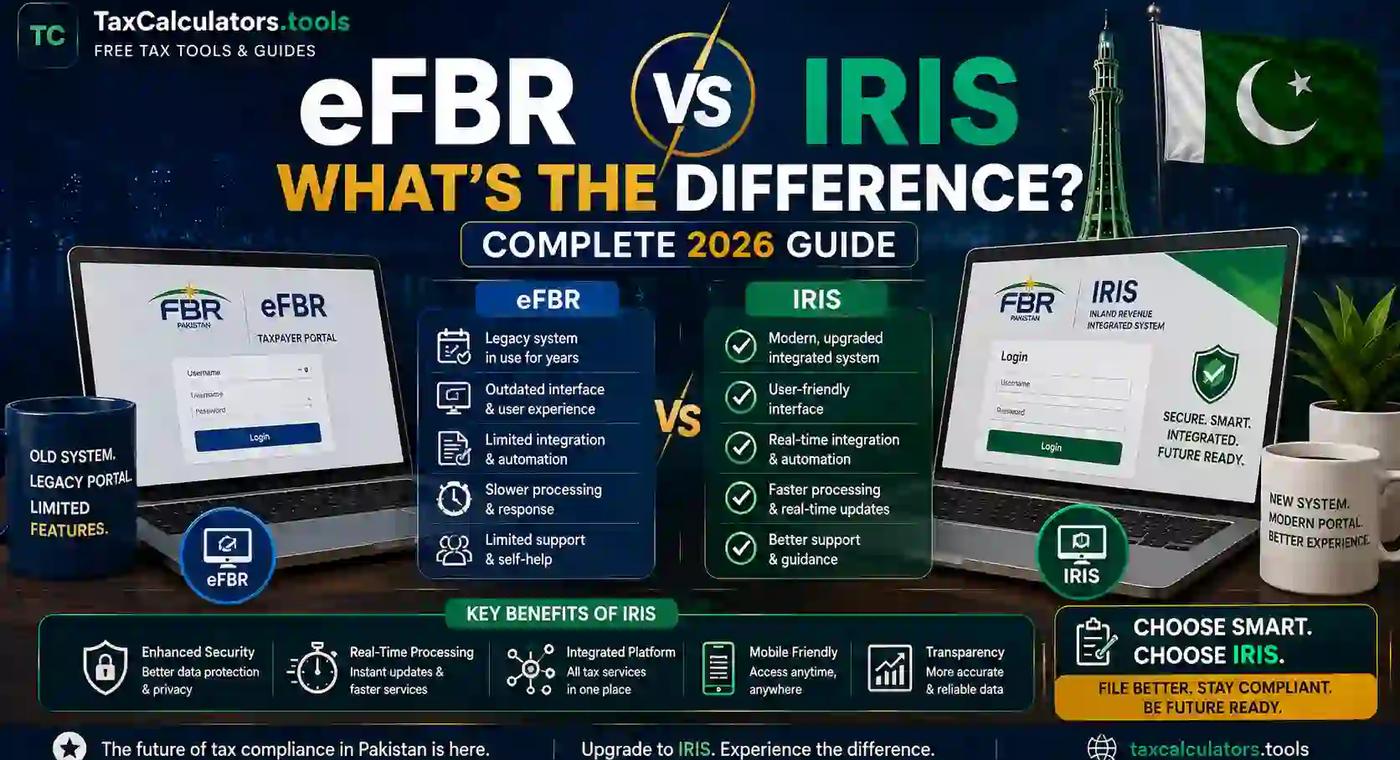
eFBR is not a separate, competing system to IRIS. eFBR was the predecessor. IRIS is the successor. When you try to access the old eFBR link today, it typically redirects you straight to IRIS, because that's where all the functionality now lives.
Think of it like an old smartphone model versus its newer version. You don't use both at the same time — the newer one has simply taken over, carrying forward the essential features while fixing what didn't work well before.
Here's how the two compare on the points that matter most to taxpayers:
Interface and speed. eFBR had a more static, form-heavy interface that could feel clunky, especially on slower internet connections. IRIS uses a more responsive, modern layout that adapts better across devices, including mobile browsers.
Login method. Under eFBR, taxpayers often logged in with a registration number or a separate FBR user ID. IRIS shifted individual taxpayers toward CNIC-based login, which reduces confusion and duplicate accounts.
Data integration. IRIS pulls data more effectively from linked systems, including NADRA verification and bank reporting, which supports more accurate ATL and NTN status checks.
Filing experience. IRIS includes better guided workflows for wealth statements and income tax returns, with clearer validation messages when a field is filled incorrectly — something the old eFBR system struggled with.
Availability of eFBR. In most cases, the standalone eFBR portal is no longer actively maintained as a separate destination; it exists mainly as a redirect path into IRIS.
Has IRIS Replaced eFBR Completely?
For practical purposes, yes. If you're filing a return, checking your ATL status, or registering for an NTN in 2026, you'll be doing all of it inside IRIS. The eFBR name still circulates because it's what long-time filers grew up using, and search habits are hard to break — but functionally, there's no separate eFBR system running parallel to IRIS anymore.
That said, if you're someone who registered many years ago under old eFBR credentials, it's worth confirming your login still works correctly inside IRIS. Password resets and CNIC verification issues are common for older accounts. Our step-by-step IRIS login guide walks through fixing common login errors, including the "invalid password" and "CNIC not found" issues.
What Is IRIS 2.0?
FBR has periodically rolled out updates to IRIS, sometimes referred to informally as "IRIS 2.0," which improve the user interface, add faster processing for return submissions, and tighten security around CNIC-based authentication. These updates don't change the fundamental purpose of the portal — filing taxes, checking ATL status, verifying NTN — but they do change how the pages look and, occasionally, where certain buttons or menus are located.
If you used IRIS a year or two ago and found the layout looks different now, that's expected. The core login URL and account details remain the same; only the interface has been refreshed.
Why Does eFBR Redirect to IRIS?
This is one of the most common points of confusion. When someone bookmarks the old eFBR web address and tries to use it months or years later, FBR's servers automatically forward that request to the IRIS login page. This isn't a bug — it's intentional. FBR consolidated its online services under IRIS to avoid maintaining two separate systems, reduce security risks from an outdated codebase, and give taxpayers a single, unified point of access.
So if your old bookmark suddenly takes you somewhere unfamiliar, you haven't landed on the wrong site. You've simply been routed to the platform that replaced the one you used to know.
How to File Your Income Tax Return on IRIS
If you're moving from the old eFBR habit to IRIS for the first time, here's a simplified overview of what the process looks like:
- Go to iris.fbr.gov.pk and select the login option for registered users, or "e-Enrollment" if you're filing for the first time.
- Log in using your CNIC (for individuals) or registration number (for AOPs and companies), along with your password and the verification PIN sent to your mobile or email.
- Once inside, navigate to the "Declaration" section and select the relevant tax year's income tax return form.
- Fill in your income details, deductions, and applicable tax credits. IRIS will often auto-populate some fields using data already on file with FBR.
- Complete your wealth statement if required — this is mandatory for most individual filers.
- Review the computed tax liability, make any required payment through the generated PSID (Payment Slip ID), and submit your return.
Before you start, it can help to estimate your liability so there are no surprises. You can run the numbers using our income tax calculator for Pakistan or the broader FBR tax calculator, which reflects the latest 2026 tax slabs.
If you'd rather not handle the filing yourself, our income tax return filing service can manage the entire submission on your behalf, including wealth statement reconciliation.
Checking Your ATL (Active Taxpayer List) Status
Your Active Taxpayer List (ATL) status determines whether you're treated as a "filer" or "non-filer" for tax purposes — a distinction that affects the withholding tax rate you pay on banking transactions, vehicle registration, property transfers, and more.
You can check your ATL status directly through IRIS or through FBR's online verification services using your CNIC or NTN. A status showing "Active" means you're currently on the taxpayer list; "Inactive" usually means either your latest return hasn't been filed yet or there's a processing delay.
If your status is showing as inactive and you believe it shouldn't be, our detailed ATL status check guide explains the most common causes and how long it typically takes to update after filing. For hands-on help correcting your status, our ATL and filer status check-and-fix service can assist directly.
Understanding the financial difference matters too — filers and non-filers pay meaningfully different withholding tax rates on the same transactions. We've broken this down in our filer vs non-filer tax rates comparison.
Is CNIC the Same as NTN?
Not exactly, though the two are closely linked. Your CNIC (Computerized National Identity Card number) is your national identity credential issued by NADRA. Your NTN (National Tax Number) is your tax identity with FBR. For most individual taxpayers registered after CNIC-integration began, your 13-digit CNIC number effectively functions as your NTN within IRIS — you don't need a separate number.
However, businesses, AOPs, and companies are issued a distinct NTN that is separate from any individual's CNIC. If you're unsure whether you already have an NTN, or need to register for one, our NTN verification tool and NTN registration service can confirm your status or get you registered.
What Is FBR and What Does It Do?
The Federal Board of Revenue (FBR) is Pakistan's apex tax collection authority, operating under the Ministry of Finance. FBR is responsible for administering income tax, sales tax, federal excise duty, and customs duty across the country. IRIS is the digital arm through which FBR delivers most of its taxpayer-facing services, while the technical infrastructure behind both IRIS and FBR's broader digital systems is maintained by Pakistan Revenue Automation Limited (PRAL), a state-owned company created specifically to handle FBR's automation needs.
You can read more about FBR's official mandate and structure directly on the Federal Board of Revenue's official website, which remains the authoritative source for tax law updates, SROs (Statutory Regulatory Orders), and official notices.
Common IRIS Login and Access Problems
Even with a more modern system, IRIS isn't immune to hiccups — especially around filing deadlines when traffic spikes. Some of the most frequently reported issues include:
- Forgotten passwords, which can be reset through the "Forgot Password" link on the IRIS login page using your registered mobile number or email.
- CNIC not recognized, often because the account was originally registered under an old registration number rather than CNIC, requiring a request to FBR's helpline to link the two.
- Portal downtime near deadlines, which is common industry-wide during the last few days before a filing deadline, when server load is at its peak.
- PIN verification delays, where the OTP sent via SMS or email takes longer than expected to arrive.
If you're consistently running into login trouble, our complete IRIS login guide covers troubleshooting steps in more detail, including what to do when the system shows a "select name" error during registration.
Is Filing a Tax Return Mandatory in Pakistan?
Yes, for individuals and entities that meet FBR's income or asset thresholds, filing an annual income tax return is a legal requirement, not an optional courtesy. This includes salaried individuals above a certain income level, business owners, property owners meeting specified criteria, and vehicle owners above certain engine capacities, among others.
Beyond the legal obligation, staying on the Active Taxpayer List brings a real financial benefit: filers pay substantially lower withholding tax rates than non-filers on banking transactions, property purchases, and vehicle registration. If you're weighing whether it's worth the effort to become a regular filer, our guide on how to become a tax filer in Pakistan lays out the process and the savings involved.
eFBR vs IRIS: Which One Should You Actually Use?
By now the answer should be clear, but to put it plainly: use IRIS. There is no scenario in 2026 where you should be searching for a standalone eFBR login, because that system no longer exists as an independent portal. Any bookmark, tutorial, or old forum post referencing "efbr.gov.pk" as a separate destination is outdated — the moment you land there, you'll be redirected to IRIS anyway.
If you're filing for the first time, registering a new NTN, or simply trying to confirm your filer status, go directly to iris.fbr.gov.pk and skip the old eFBR search entirely. It will save you a step and avoid any confusion about broken or redirected links.
Practical Tips for a Smooth IRIS Experience
A few small habits can make your time on IRIS considerably less frustrating:
- File early rather than waiting for the final week of the deadline, when server traffic is heaviest and slowdowns are common.
- Keep your CNIC, bank account details, and prior year's return handy before you start, so you're not searching for documents mid-session.
- Double-check your mobile number and email on file are current, since OTPs and PIN verification depend on both.
- Use a desktop or laptop browser where possible for return filing — while IRIS is reasonably mobile-friendly for checking status, full return submission tends to be smoother on a larger screen.
- Save your PSID and payment confirmation after submitting, in case you need to reference it for a future audit query or bank verification.
Frequently Asked Questions
What is the difference between IRIS, e.FBR, and eFBR? eFBR (also written e.FBR) was FBR's older online tax filing system. IRIS is the current system that replaced it. They aren't two separate active platforms — IRIS is where all filing, registration, and verification now happens.
Has IRIS replaced eFBR completely? Yes. The standalone eFBR portal is no longer independently maintained; old eFBR links typically redirect users straight into IRIS.
Is IRIS the same as eFBR? Not identical, but IRIS is the direct successor to eFBR, carrying forward the same core functions — return filing, wealth statements, and NTN services — with an upgraded interface and better NADRA integration.
What is IRIS FBR used for? IRIS is used for income tax return filing, wealth statement submission, sales tax returns, NTN registration and verification, and checking your Active Taxpayer List (ATL) status.
How do I log in to the IRIS FBR portal? Visit iris.fbr.gov.pk, select the login option, and enter your CNIC (for individuals) along with your password and the OTP sent to your registered mobile or email.
Do I still need eFBR to file my tax return? No. All filing now takes place through IRIS. There's no separate eFBR step required.
What is IRIS 2.0 and how is it different? IRIS 2.0 refers to periodic interface and performance updates FBR has rolled out to the IRIS portal. The login process and account details stay the same, but the layout and some workflows may look different from earlier versions.
How do I check my ATL (Active Taxpayer List) status? You can check your ATL status through IRIS or FBR's online verification service using your CNIC or NTN. Our ATL status check guide explains the process in detail.
Is CNIC the same as NTN? For most individual taxpayers, yes — your CNIC functions as your NTN within IRIS. Businesses and companies are issued a separate NTN.
Final Thoughts: Move On From eFBR, Settle Into IRIS
The confusion around "eFBR vs IRIS" is understandable — old habits and old bookmarks don't disappear overnight, especially for a government portal that many people only visit once a year. But the reality is simple: eFBR was yesterday's system, and IRIS is today's. There's nothing to compare feature-by-feature because one has fully absorbed the other.
If you're getting ready to file this year, don't waste time hunting for an eFBR login that no longer exists independently. Head straight to IRIS, and if you want to estimate your tax liability first, use our advance free tax calculators to get a clear number before you sit down to file. And if you'd rather have the entire process — registration, filing, or ATL correction — handled for you, our team at Tax Calculators is ready to help.
Important disclaimer
This article is for educational planning only. It does not provide professional tax, legal, accounting, payroll, customs, or financial advice. Tax rules can change and final results may depend on your personal facts. Always verify important tax decisions with official sources or a qualified professional.
About the author
This article was written by the Tax Calculators Team, the group behind TaxCalculators.tools. Learn more about our team and editorial process.
Last reviewed: August 27, 2026