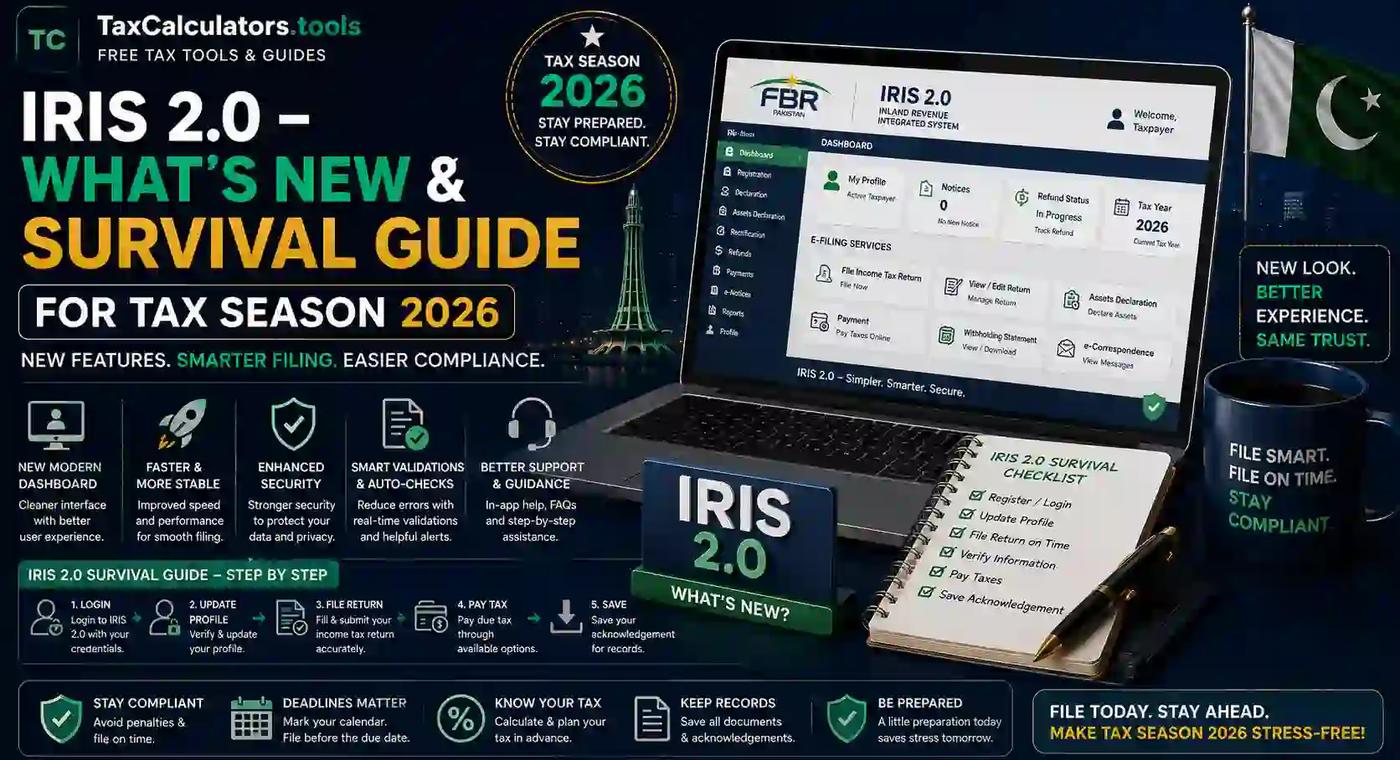
If you've logged into iris.fbr.gov.pk this year and felt like you'd landed on a completely different website, you're not imagining things. FBR IRIS 2.0 is a genuine overhaul of Pakistan's tax filing system, not just a fresh coat of paint, and it's changing how millions of taxpayers register, file, and stay compliant this tax season.
Whether you're a salaried employee filing for the first time, a freelancer juggling foreign remittances, or a business owner who's filed a dozen returns before, this guide walks you through exactly what's changed in IRIS 2.0, why it matters, and how to get through Tax Year 2026 filing without losing your mind — or your ATL status.
What Is IRIS 2.0?
IRIS stands for Integrated Revenue Information System — the Federal Board of Revenue's official digital platform for income tax registration, filing, and compliance in Pakistan. It replaced the older manual and e.FBR systems years ago, and IRIS 2.0 is simply the newest, redesigned version of that same portal.
Developed and maintained by Pakistan Revenue Automation Limited (PRAL), IRIS 2.0 launched with a cleaner interface, faster processing, and better mobile compatibility. It's now the single point of access for individuals, salaried employees, freelancers, business owners, Associations of Persons (AOPs), and companies to handle everything from NTN registration to wealth statement submission.
In short: if you earn income in Pakistan and need to interact with FBR in any capacity, IRIS 2.0 is where that happens. There's no separate app or workaround — this portal is it.
Why IRIS 2.0 Matters This Tax Season
Tax season in Pakistan isn't optional anymore for most earners, and IRIS 2.0 raises the stakes in a few specific ways.
First, the Tax Year 2026 return form is noticeably more detailed than in previous years, with expanded disclosure requirements around assets, property, and income sources. This reflects FBR's broader push toward better documentation of the economy, tying into third-party data integration from banks, utility companies, and land authorities under the Finance Act framework. Put simply: FBR now cross-checks your declared income against outside data sources more aggressively than before, so accuracy matters more than ever.
Second, the filing window and portal behavior have both shifted. FBR officially opened Tax Year 2026 filing on 27 July 2026, but the submission button itself was activated weeks later after taxpayers had prepared draft returns they couldn't yet finalize. That kind of portal delay isn't unusual with a major system upgrade, but it does mean you shouldn't assume "I logged in early" equals "I filed early." Keep checking.
Third, because the new form takes longer to complete, filing early gives you breathing room to fix errors, gather missing documents, or get professional help before the crunch hits in September. The standard deadline for individuals and AOPs is 30 September 2026, and waiting until the last week is exactly how people end up with rejected submissions, server timeouts, or missed deductions.
If you want a broader walkthrough of the portal itself before diving into what's new, our FBR IRIS Portal Guide for 2026–2027 is a good companion read.
What's Actually New in IRIS 2.0
Based on FBR's official rollout and reporting from tax professionals, here's what has genuinely changed compared to the older IRIS interface:
A redesigned, more intuitive interface. The layout is cleaner and easier to navigate, especially for first-time filers who previously found the old IRIS screens confusing and cluttered.
A single sign-on, unified dashboard. You can now access income tax returns, sales tax registration, NTN management, and wealth statements from one dashboard instead of jumping between disconnected modules.
Faster NADRA verification. Registration that used to stall on identity verification now processes more quickly when your CNIC and mobile number are correctly linked with NADRA.
Better mobile-browser compatibility. IRIS 2.0 is mobile-responsive, and FBR does offer an app, though the full return-filing experience is still noticeably smoother on a desktop browser like Chrome or Firefox.
Expanded, more detailed return forms. As mentioned above, the Tax Year 2026 forms ask for more granular detail on assets, property, and income sources than earlier years' forms did.
Tighter integration with the ATL update cycle. Your Active Taxpayer List status now syncs more directly with your filing activity inside the portal, which matters if you're trying to avoid Non-ATL penalties.
None of these changes are cosmetic. They reflect FBR's larger goal — moving Pakistan's tax system toward automated compliance monitoring, in step with the country's Digital Pakistan initiative.
IRIS 2.0 vs the Old IRIS: What You'll Notice First
Instead of a table, here's the honest, practical comparison taxpayers are reporting:
Old IRIS felt like a static government form scanned into a browser — dense menus, slow verification, and screens that hadn't changed in years. IRIS 2.0 feels more like a modern dashboard: fewer clicks to reach your return, a single login for multiple tax functions, and a mobile experience that actually works instead of just technically loading.
The core filing logic — income, deductions, wealth statement — hasn't fundamentally changed. What's changed is how much friction you go through to get there, and how much more information the form now expects from you upfront.
How to Register on FBR IRIS 2.0
If you've never filed before, registration is free and typically takes 10–15 minutes, assuming your CNIC and mobile number are already correctly linked with NADRA. Here's the general flow:
- Go to iris.fbr.gov.pk and select the registration option for an unregistered person.
- Enter your CNIC, mobile number, and email address.
- Complete the SMS and email verification codes sent to you.
- Set your IRIS password once your identity is confirmed.
For individuals, your CNIC functions as your NTN — you don't need a separate 7-digit NTN unless you're registering a business, an AOP, or a company. If you want a deeper walkthrough of registration specifically, including how to fix common NADRA mismatch errors, check our NTN registration service page.
Overseas Pakistanis can also register using their CNIC or NICOP and file remotely, though SMS verification typically still requires a Pakistani mobile number — worth sorting out ahead of time if you're abroad.
How to Log In and Navigate the New Dashboard
Once registered, logging in uses your CNIC (or NTN, if applicable) and your password. IRIS 2.0's dashboard is designed to be self-explanatory, but if you're switching from the old interface, expect a short adjustment period since menus and terminology have shifted.
Never share your IRIS password or OTP with anyone, including tax agents or consultants. FBR will never ask for your password, and sharing credentials can result in your account being misused — a warning worth repeating every tax season.
If you're running into login errors specifically, our detailed FBR IRIS login guide covers the most common fixes step by step.
Step-by-Step: Filing Your Income Tax Return on IRIS 2.0
Here's the practical filing sequence for Tax Year 2026:
Step 1 — Log in to iris.fbr.gov.pk with your registered CNIC/NTN and password.
Step 2 — Select the relevant tax year. Make sure you're filing for the correct period; selecting the wrong tax year is a surprisingly common mistake.
Step 3 — Choose your return type. IRIS 2.0 will show the applicable return form based on your taxpayer profile — salaried, business, AOP, or company. Select accordingly, since each category uses a different form structure.
Step 4 — Enter your income details. Input total income from salary, business, property, capital gains, freelance work, or other sources. IRIS 2.0 may pre-fill some data automatically, but always verify it before submitting — pre-filled data isn't guaranteed to be accurate.
Step 5 — Add deductions and tax credits. This is where many taxpayers unintentionally lose money. Claim deductions for employer withholding tax (WHT), advance tax already paid, and any eligible tax credits.
Step 6 — Complete the Wealth Statement. You'll need to declare assets and liabilities as of June 30. This step has become more detailed under IRIS 2.0, so gather your bank statements, property records, and vehicle documentation before you start.
Step 7 — Review and submit. Carefully check your declarations — income, tax credits, withholding taxes, bank accounts, assets, and liabilities — before final submission, since revisions afterward may require additional compliance procedures.
If crunching the numbers before you file sounds useful, our FBR income tax calculator can help you estimate your liability ahead of time so there are no surprises on the IRIS form itself.
Common IRIS 2.0 Errors and How to Fix Them
A few recurring headaches show up every tax season, and IRIS 2.0 hasn't eliminated them entirely:
- "Select Name" error during registration — usually resolved by double-checking that your name matches NADRA records exactly, including spacing and spelling.
- Login failures or "internal server error" — often tied to portal traffic spikes close to the deadline; try again during off-peak hours, typically early morning.
- Submission button greyed out — this happened portal-wide earlier in the 2026 season due to a system-side delay, not a fault in your account. If your draft return is complete but won't submit, wait and retry rather than assuming your data is wrong.
- Forgotten password or locked account — use the password reset option tied to your registered mobile number and email; avoid creating a second account, which can cause duplicate NTN issues.
- Pre-filled data mismatches — always manually verify pre-filled salary or WHT figures against your own records before submitting, since automated data pulls aren't always current.
For a full breakdown of navigating portal errors, our companion piece — FBR tax deadlines and calendar guide — is useful for planning around known high-traffic periods so you're not fighting the server on deadline day.
Understanding ATL Status and Why It Matters More Now
Your Active Taxpayer List (ATL) status determines whether you pay standard or significantly higher withholding tax rates on banking transactions, property purchases, vehicle registration, and more. IRIS 2.0's tighter integration with the ATL update cycle means your filing status now reflects faster in the system — which is good news if you file on time, and bad news if you don't.
Falling off the ATL isn't just a paperwork inconvenience. Non-filer status brings a punitive cash withdrawal tax rate and can affect eligibility for certain contracts and financial transactions. If you're unsure where you stand, our ATL status check guide walks you through verifying and correcting your status directly.
Filer vs Non-Filer: What Changes With IRIS 2.0
The core filer/non-filer distinction in Pakistan's tax system hasn't changed with the new portal — but IRIS 2.0's better data integration means the financial gap between the two categories is enforced more consistently. Filers continue to benefit from lower withholding tax rates across banking, property, and vehicle transactions, while non-filers face increasingly steep differentials.
If you've been putting off becoming a filer, this season's improved registration speed (thanks to faster NADRA verification) removes one of the bigger excuses. See our guide on how to become a tax filer in Pakistan and our breakdown of filer vs non-filer tax rates for the full financial picture.
Wealth Statement Filing: What's Different in IRIS 2.0
The wealth statement component deserves its own mention because it's where IRIS 2.0's expanded disclosure requirements hit hardest. You're now expected to provide more granular detail on property holdings, bank balances, and other assets and liabilities as of June 30. This ties directly into FBR's third-party data integration from banks, utility providers, and land authorities — meaning discrepancies between what you declare and what those institutions report to FBR are more likely to be flagged than in previous years.
Practical tip: pull your bank statements and property documentation before you sit down to file, rather than trying to reconstruct figures from memory. It'll save you from having to submit revisions later, which come with their own compliance headaches.
Filing for Freelancers, Overseas Pakistanis, and Business Owners
IRIS 2.0 didn't create separate portals for different taxpayer types, but the experience does vary meaningfully by category:
Freelancers working with international clients need to correctly categorize foreign remittances and ensure any applicable exemptions are properly claimed within the income details section.
Overseas Pakistanis can register and file remotely using their CNIC or NICOP, though a Pakistani mobile number is generally still required for SMS-based verification steps.
Business owners and AOPs face the most detailed version of the return form, given the additional business income declarations, asset schedules, and — where applicable — sales tax registration requirements handled through the same unified dashboard.
If you're setting up a new business alongside sorting out your tax profile, it's worth understanding how registration and compliance intersect from the start — our income tax return filing service covers this for business owners specifically.
Key Deadlines for Tax Year 2026
Mark these dates clearly:
- 27 July 2026 — Tax Year 2026 filing window officially opened.
- 30 September 2026 — Standard deadline for individuals and AOPs to file their income tax returns.
FBR has urged all taxpayers to file accurately, honestly, and on time, and has explicitly encouraged early filing to avoid the system slowdowns and technical issues that tend to spike in the final days before the deadline. Given that IRIS 2.0's new form takes longer to complete, that advice carries more weight this year than in past seasons.
Practical Tips for a Smoother Tax Season
A few habits make a measurable difference during IRIS 2.0 filing:
- File early rather than in the final week of September, when server load is highest.
- Use desktop with Chrome or Firefox for the actual filing process, even though mobile access works for quick checks.
- Verify every pre-filled field manually — don't assume automated data pulls are accurate.
- Keep your bank statements, property documents, and WHT certificates on hand before you start the wealth statement section.
- Double-check your selected tax year and return type before entering any data.
- Never share your password or OTP, even with someone claiming to be from FBR.
Frequently Asked Questions
What is IRIS 2.0? IRIS 2.0 is the Federal Board of Revenue's redesigned version of its Integrated Revenue Information System — Pakistan's official portal for income tax registration, filing, and compliance, accessible at iris.fbr.gov.pk.
What is the last date for filing tax returns in Pakistan for 2026? The standard deadline for individuals and Associations of Persons (AOPs) to file their Tax Year 2026 income tax return is 30 September 2026.
Is IRIS 2.0 mobile-responsive? Yes, IRIS 2.0 works on mobile browsers and FBR also offers a dedicated app, though the full return-filing experience is generally smoother on a desktop browser.
Do I need a separate NTN if I already have a CNIC? No. For individuals, your CNIC functions as your NTN. A separate NTN is only required if you're registering a business, an AOP, or a company.
How is IRIS 2.0 different from the old e.FBR system? IRIS 2.0 has a redesigned, more intuitive interface, a single unified dashboard, faster NADRA verification, and better mobile compatibility compared to the older e.FBR and legacy IRIS systems.
Can overseas Pakistanis file returns on IRIS 2.0? Yes, overseas Pakistanis can register and file using their CNIC or NICOP, though SMS-based verification typically still requires a Pakistani mobile number.
Why was IRIS 2.0 return submission delayed for Tax Year 2026? FBR activated the submission button several weeks after the filing window opened on 27 July 2026, after which taxpayers with completed draft returns were able to submit them.
Conclusion: Don't Wait Until September
IRIS 2.0 is a real improvement over the old FBR portal — faster verification, a cleaner dashboard, and better mobile access — but it also comes with a more detailed return form and higher expectations around accurate asset and income disclosure. The taxpayers who have the smoothest tax season are the ones who start early, verify every pre-filled field, and keep their documentation organized before they even log in.
If you want to estimate your tax liability before you sit down with the actual IRIS 2.0 form, try our free FBR tax calculator or explore our full range of advanced free tax calculators built specifically for Pakistan's 2026 tax rules. And if you'd rather have your ATL status or NTN registration checked and corrected by someone else, our ATL status check and fix service can handle that for you directly.
Important disclaimer
This article is for educational planning only. It does not provide professional tax, legal, accounting, payroll, customs, or financial advice. Tax rules can change and final results may depend on your personal facts. Always verify important tax decisions with official sources or a qualified professional.